Saturday, February 13, 2021

PORTS

 A port is a physical docking point using which an external device can be connected to the computer. It can also be programmatic docking point through which information flows from a program to the computer or over the Internet.

Characteristics of Ports

A port has the following characteristics −

  • External devices are connected to a computer using cables and ports.

  • Ports are slots on the motherboard into which a cable of external device is plugged in.

  • Examples of external devices attached via ports are the mouse, keyboard, monitor, microphone, speakers, etc.
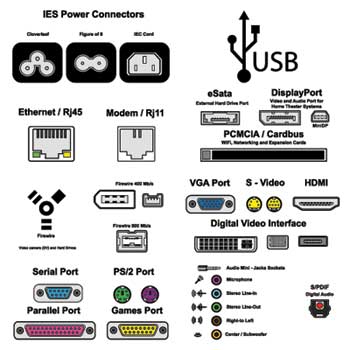
Computer Ports

Serial Port

  • Used for external modems and older computer mouse

  • Two versions: 9 pin, 25 pin model

  • Data travels at 115 kilobits per second

Parallel Port

  • Used for scanners and printers

  • Also called printer port

  • 25 pin model

  • IEEE 1284-compliant Centronics port

PS/2 Port

  • Used for old computer keyboard and mouse

  • Also called mouse port

  • Most of the old computers provide two PS/2 port, each for the mouse and keyboard

  • IEEE 1284-compliant Centronics port

Universal Serial Bus (or USB) Port

  • It can connect all kinds of external USB devices such as external hard disk, printer, scanner, mouse, keyboard, etc.

  • It was introduced in 1997.

  • Most of the computers provide two USB ports as minimum.

  • Data travels at 12 megabits per seconds.

  • USB compliant devices can get power from a USB port.

VGA Port

  • Connects monitor to a computer's video card.

  • It has 15 holes.

  • Similar to the serial port connector. However, serial port connector has pins, VGA port has holes.

Power Connector

  • Three-pronged plug.

  • Connects to the computer's power cable that plugs into a power bar or wall socket.

Firewire Port

  • Transfers large amount of data at very fast speed.

  • Connects camcorders and video equipment to the computer.

  • Data travels at 400 to 800 megabits per seconds.

  • Invented by Apple.

  • It has three variants: 4-Pin FireWire 400 connector, 6-Pin FireWire 400 connector, and 9-Pin FireWire 800 connector.

Modem Port

  • Connects a PC's modem to the telephone network.

Ethernet Port

  • Connects to a network and high speed Internet.

  • Connects the network cable to a computer.

  • This port resides on an Ethernet Card.

  • Data travels at 10 megabits to 1000 megabits per seconds depending upon the network bandwidth.

Game Port

  • Connect a joystick to a PC

  • Now replaced by USB

Digital Video Interface, DVI port

  • Connects Flat panel LCD monitor to the computer's high-end video graphic cards.

  • Very popular among video card manufacturers.

Sockets

  • Sockets connect the microphone and speakers to the sound card of the computer.


Memory of Computer

 Memory unit is the amount of data that can be stored in the storage unit. This storage capacity is expressed in terms of Bytes.

The following table explains the main memory storage units −

S.No.Unit & Description
1

Bit (Binary Digit)

A binary digit is logical 0 and 1 representing a passive or an active state of a component in an electric circuit.

2

Nibble

A group of 4 bits is called nibble.

The following table lists some higher storage units −

S.No.Unit & Description
1

Kilobyte (KB)

1 KB = 1024 Bytes

2

Megabyte (MB)

1 MB = 1024 KB

3

GigaByte (GB)

1 GB = 1024 MB

4

TeraByte (TB)

1 TB = 1024 GB

5

PetaByte (PB)

1 PB = 1024 TB

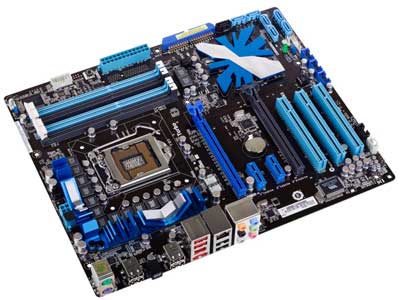
MOTHERBOARD

 The motherboard serves as a single platform to connect all of the parts of a computer together. It connects the CPU, memory, hard drives, optical drives, video card, sound card, and other ports and expansion cards directly or via cables.

Mother Board

Features of Motherboard

A motherboard comes with following features −

  • Motherboard varies greatly in supporting various types of components.

  • Motherboard supports a single type of CPU and few types of memories.


Popular Manufacturers

Following are the popular manufacturers of the motherboard.

  • Intel
  • ASUS
  • AOpen
  • ABIT

    Description of Motherboard

    The motherboard is mounted inside the case and is securely attached via small screws through pre-drilled holes. 

  • Biostar
  • Gigabyte
  • MSIThere is a peripheral card slot in front of the motherboard using which video cards, sound cards, and other expansion cards can be connected to the motherboard

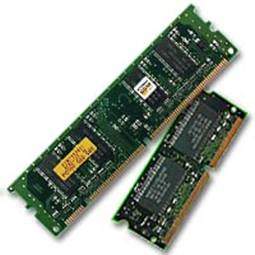
RAM of Computer.

 RAM (Random Access Memory) is the internal memory of the CPU for storing data, program, and program result. It is a read/write memory which stores data until the machine is working. As soon as the machine is switched off, data is erased.

Primary Memory

RAM is of two types −

  • Static RAM (SRAM)
  • Dynamic RAM (DRAM)

    Static RAM (SRAM)

    The word static indicates that the memory retains its contents as long as power is being supplied SRAM chips use a matrix of 6-transistors and no capacitors. Transistors do not require power to prevent leakage, so SRAM need not be refreshed on a regular basis.

  • Characteristic of Static RAM

    • Long life
    • No need to refresh
    • Faster
    • Used as cache memory
    • Large size
    • Expensive
    • High power consumption

      Dynamic RAM (DRAM)

      DRAM, unlike SRAM, must be continually refreshed in order to maintain the data. This is done by placing the memory on a refresh circuit that rewrites the data several hundred times per second. DRAM is used for most system memory as it is cheap and small.

      Characteristics of Dynamic RAM

      • Short data lifetime
      • Needs to be refreshed continuously
      • Slower as compared to SRAM
      • Used as RAM
      • Smaller in size
      • Less expensive
      • Less power consumption

Thursday, February 11, 2021

Output devices of computer.

 Following are some of the important output devices used in a computer.

  • Monitors
  • Graphic Plotter
  • Printer

Monitors

Monitors, commonly called as Visual Display Unit (VDU), are the main output device of a computer. It forms images from tiny dots, called pixels that are arranged in a rectangular form. The sharpness of the image depends upon the number of pixels.

There are two kinds of viewing screen used for monitors.

  • Cathode-Ray Tube (CRT)
  • Flat-Panel Display

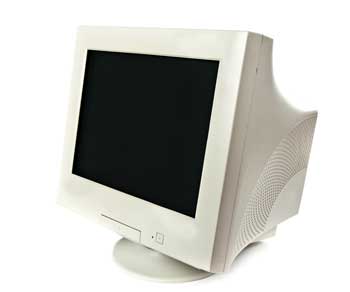
Cathode-Ray Tube (CRT) Monitor

The CRT display is made up of small picture elements called pixels. The smaller the pixels, the better the image clarity or resolution. It takes more than one illuminated pixel to form a whole character, such as the letter ‘e’ in the word help.

CRT Monitor
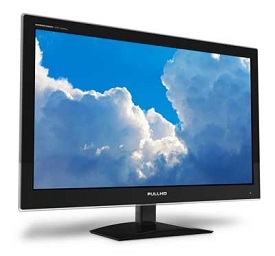
Flat-Panel Display Monitor
The flat-panel display refers to a class of video devices that have reduced volume, weight and power requirement in comparison to the CRT. 
Flat Monitor

The flat-panel display is divided into two categories −

  • Emissive Displays − Emissive displays are devices that convert electrical energy into light. For example, plasma panel and LED 

  • Non-Emissive Displays − Non-emissive displays use optical effects to convert sunlight or light from some other source into graphics patterns. For example, LCD (Liquid-Crystal Device).

Printers

Printer is an output device, which is used to print information on paper.

There are two types of printers −

  • Impact Printers
  • Non-Impact PrintersDaisy Wheel

    Head is lying on a wheel and pins corresponding to characters are like petals of Daisy (flower) which is why it is called Daisy Wheel Printer. 

    Daisy Wheel Printer

  • Impact Printers

    Impact printers print the characters by striking them on the ribbon, which is then pressed on the paper.

    Characteristics of Impact Printers are the following −

    • Very low consumable costs
    • Very noisyThese printers are of two types −
      • Character printers
      • Line printers

      Character Printers

      Character printers are the printers which print one character at a time.

      These are further divided into two types:

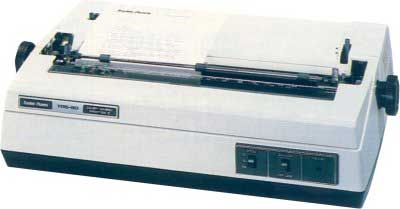
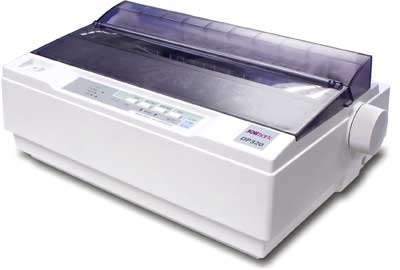
      • Dot Matrix Printer(DMP)
      • Daisy Wheel

      Dot Matrix Printer

      In the market, one of the most popular printers is Dot Matrix Printer. These printers are popular because of their ease of printing and economical price. 

      Advantages

      • Inexpensive
      • Widely Used
      • Other language characters can be printed

      Disadvantages

      • Slow Speed
      • Poor Quality
      Dot Matrix Printer


Input devices of computers

 Following are some of the important input devices which are used in a computer −

  • Keyboard
  • Mouse
  • Joy Stick
  • Light pen
  • Track Ball
  • Scanner
  • Graphic Tablet
  • Microphone
  • Magnetic Ink Card Reader(MICR)
  • Optical Character Reader(OCR)
  • Bar Code Reader
  • Optical Mark Reader(OMR)

CPU(Central processing unit)

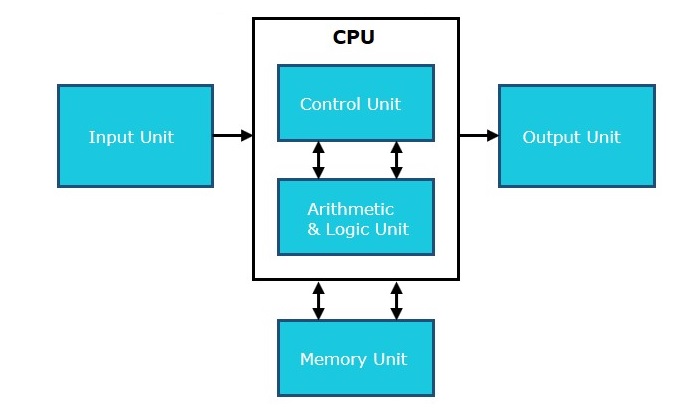
 CPU itself has following three components.

  • Memory or Storage Unit
  • Control Unit
  • ALU(Arithmetic Logic Unit)
Computer Architectures

Central Processing Unit (CPU) consists of the following features −

  • CPU is considered as the brain of the computer.
  • CPU performs all types of data processing operations.
  • It stores data, intermediate results, and instructions (program).